Compression Distance
So I’ve recently looked into compression based distances as part of research for a masters course at the TU Berlin. What I found was a really interesting way of measuring distances between two textures (i.e. images).
Distances? Images!?
Yep. In principle one could measure some distances between any two objects. For example an acceptable distance measure between two images could be the difference in pixels or the difference in brightness. These distance measures all have their field of application but when normal humans talk about similarity in images they mean something different. Computers in general however have a hard time figuring out what we humans consider similar.
Compression based distances
One way to measure distances between objects in general is called compression distance. The way it works could be roughly described as
The more efficiently an algorithm can compress object A given object B the more similar the two objects are.
So what does that mean? As a little example: Take the sentence A: “I like ice cream.” and compare it to the two sentences B: “I like ice tea.” and C: “Has Anyone Really Been Far Even as Decided to Use Even Go Want to do Look More Like?”. Of course sentence A is more similar to B than C. But how could a computer measure that similarity? Easy! Just use a compression based distance.
When compressing “I like ice cream.” together with “I like ice tea.” a lot of information can be compressed (for example both sentences share the prefix I like ice in common). Compressing sentence A and C together would have a lot less potential for compression (none of the words in sentence A are contained in C).
And that’s the concept of compression based distances. Don’t believe me? Try it:
Lower means more similar. Edit any sentence to recompute.
Campana-Keogh-1
No I didn’t just sneezed. Campana-Keogh-1 or CK-1 for short is a neat little algorithm for measuring the distance between two images. And because no one wants to write complicated algorithms this one is very simple.
The idea is to let someone else do all the work: MPEG-1. MPEG-1 is used for compressing videos and it is really good at it! One very cool feature of such video encoding algorithms is the predictive frame. When using predictive frames only the difference to the preceding image is stored. So when two following images in a video are similar (which is often the case in movies), MPEG-1 only has to store the pixels that differ between the two images. Very neat, huh?
So what CK-1 is basically doing is to create two-frame videos. The smaller the resulting video-file the more similar the two images are. So the CK-1 algorithm basically just looks like this:
function distance = CK1Distance(x,y)
  distance = mpegSize(x,y) + mpegSize(y,x);
  distance /= mpegSize(x,x) + mpegSize(y,y);
  distance −= 1;
end
The function mpegSize(x,y) just returns the size of an MPEG-1 video with two frames x and y. Simple as that. But the results are very nice!
Who is this Mulder guy?
So I’ve been watching some x-files episodes lately and because I always like to do stuff while I’m binging a TV series I decided to test the CK-1 algorithm on Mulder.
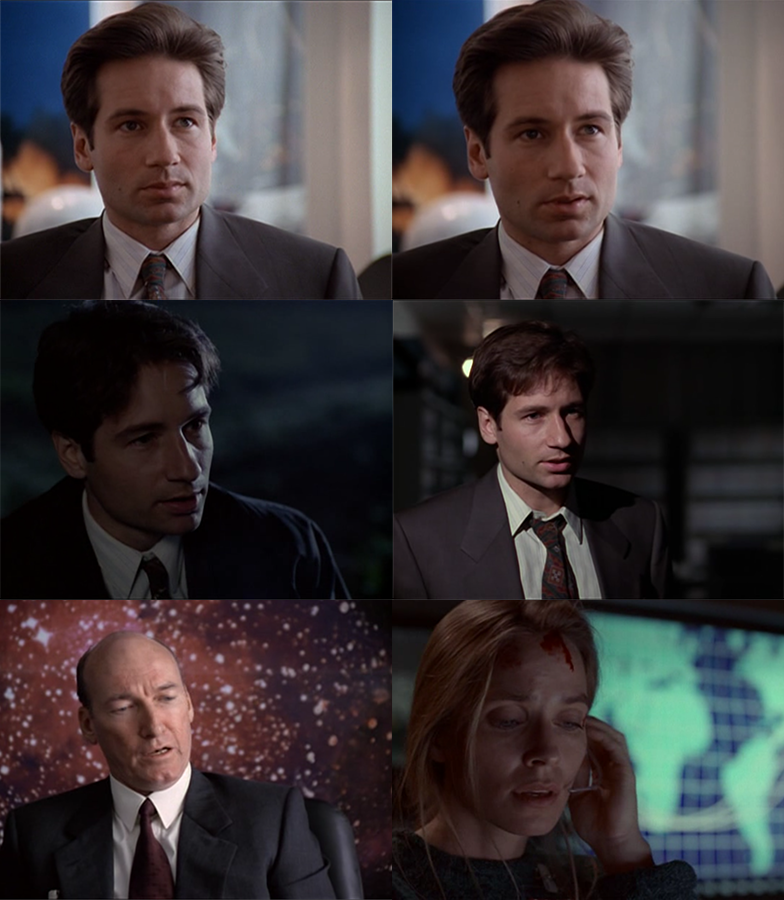
So I took 4 screenshots of Mulder and 2 from other people in similar poses. Then I ran these images through my self-written little CK-1 Java program (because who the heck has a license for Matlab??) and these were the results:
d(mulder1.png,mulder1.png) = 0.0
d(mulder1.png,mulder2.png) = 0.6300178810907466
d(mulder1.png,mulder3.png) = 0.7965330333401515
d(mulder1.png,mulder4.png) = 0.9076955523269439
d(mulder1.png,someone.png) = 1.0699117676216914
d(mulder1.png,someone2.png) = 1.1179630519282

d(mulder2.png,mulder2.png) = 0.0
d(mulder2.png,mulder3.png) = 0.7866943866943867
d(mulder2.png,mulder4.png) = 0.882641168355454
d(mulder2.png,someone.png) = 1.0327691102945606
d(mulder2.png,someone2.png) = 1.080532305920907

d(mulder3.png,mulder3.png) = 0.0
d(mulder3.png,mulder4.png) = 0.8846048223210854
d(mulder3.png,someone.png) = 1.037555178268251
d(mulder3.png,someone2.png) = 0.9344867708807609

d(mulder4.png,mulder4.png) = 0.0
d(mulder4.png,someone.png) = 1.0254100592831557
d(mulder4.png,someone2.png) = 0.9044922962687953

d(someone.png,someone.png) = 0.0
d(someone.png,someone2.png) = 1.045421475903022

d(someone2.png,someone2.png) = 0.0
Okay, mulder1 and mulder2 are almost the same images. Some basic histogram analysis would have revealed that these two images would be the most similar. But the fact that mulder3 is more similar to the other Mulders than to the random persons (even if the margin is not that high) is pretty neat. The mulder4 images seems to be more similar to someone2 than to mulder1 but I think that’s okay if we think about how simple and fast this algorithm is.
Do some stuff!
If you want to you can try my super cool CK-1 distance calculator on your own! Just download it from here and run it like this:
$ java -jar CK1Java.jar /path/to/folder/with/imgs/
 - OR -
$ java -jar CK1Jar.jar img1.png img2.png
You just have to have mencoder installed and available before running.